Workouts
Approving workouts
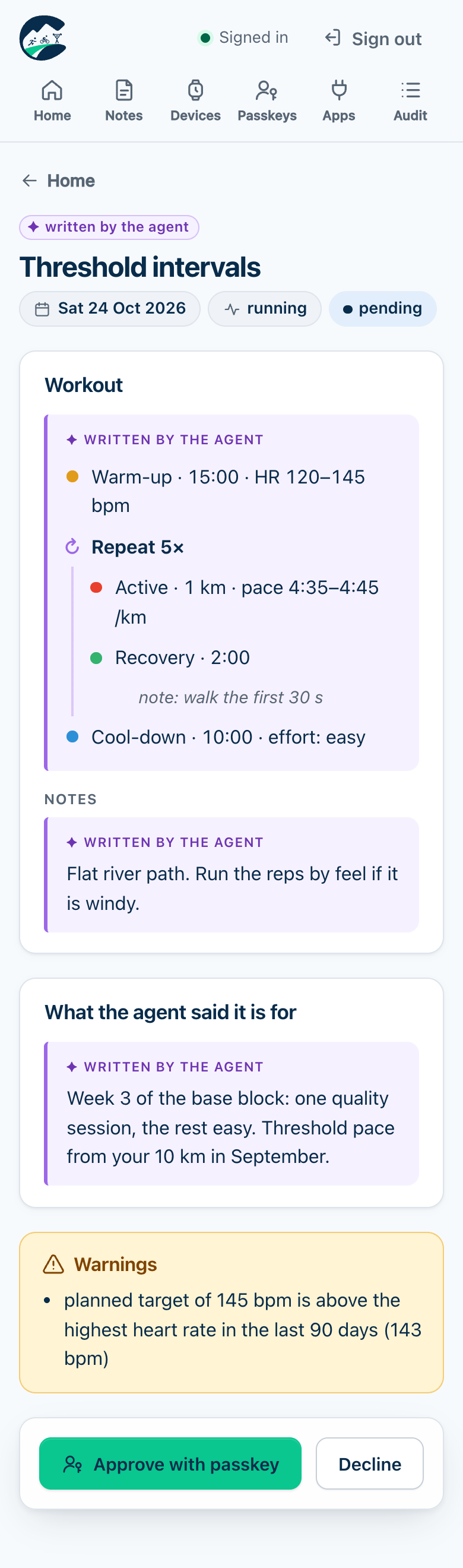
Every workout the agent proposes waits for your passkey.
- The agent proposes it; coachd stores it as
pending, with warnings. With ntfy on, your phone gets a notice. - On the page you see its steps, the warnings and the agent’s reasons (labelled as agent text). Approve with your passkey, or decline.
- The watch app picks it up on its next sync. Without the app, download the FIT file and copy it to the watch’s
GARMIN/NewFiles, or download a Zwift workout for a ride.
A week at a time
When several workouts are waiting, Review all on the home page shows each one in full and approves them all with one passkey prompt: exactly the workouts shown, or none if any changed meanwhile. To leave one out, decline it first.
Statuses
| Status | Meaning |
|---|---|
pending | Waiting for you; expires at the end of its date. |
approved | Approved; waiting for the watch or a download. |
delivering | The watch fetched it and hasn’t confirmed yet. |
delivered | The watch confirmed it, or you downloaded its FIT or Zwift file. |
delivery_failed | No confirmation within 15 minutes; the next sync retries. |
declined | You declined it. |
withdrawn | You withdrew it, or approved a replacement after approving it. The watch app removes it. |
cancelled | The agent cancelled it before you decided. |
superseded | You approved a replacement while it was pending. |
expired | Its date passed while pending. |
A proposal never changes once stored: the agent changes a plan by proposing a replacement, and you approve that.
One delivery path per workout
A FIT file copied over USB is a separate workout on the watch, and the watch app still downloads its own copy, so you get two. The app removes only its own copy when a workout is withdrawn or replaced; delete a USB copy by hand.
Last updated on